Configure optional notifications
In addition to the primary orders topic, Mercado Pago provides optional topics to notify your application about integration management events, such as account linking via OAuth, buyer-initiated claims, chargebacks, and fraud alerts. These notifications complement the main flow and ensure that your system remains up to date with events that go beyond payment processing.
None of these topics replace the orders topic or are mandatory. Enable only those relevant to your integration.
Available topics
| Topic | Panel name | Description |
mp-connect | Application linking | Notifies when an account is linked or unlinked through OAuth. Applies to all integrations that use OAuth. |
topic_claims_integration_wh | Claims | Notifies when a buyer initiates a claim or when a status change occurs. |
topic_chargebacks_wh | Chargebacks | Notifies when the buyer initiates a chargeback or a status change occurs. For more information, see the chargebacks documentation. |
stop_delivery_op_wh | Fraud alerts | Notifies when a fraud alert is detected on an order. Upon receiving it, you must cancel the order without delivering it. |
Configure Webhooks
Follow the steps below to enable the optional topics in your integration.
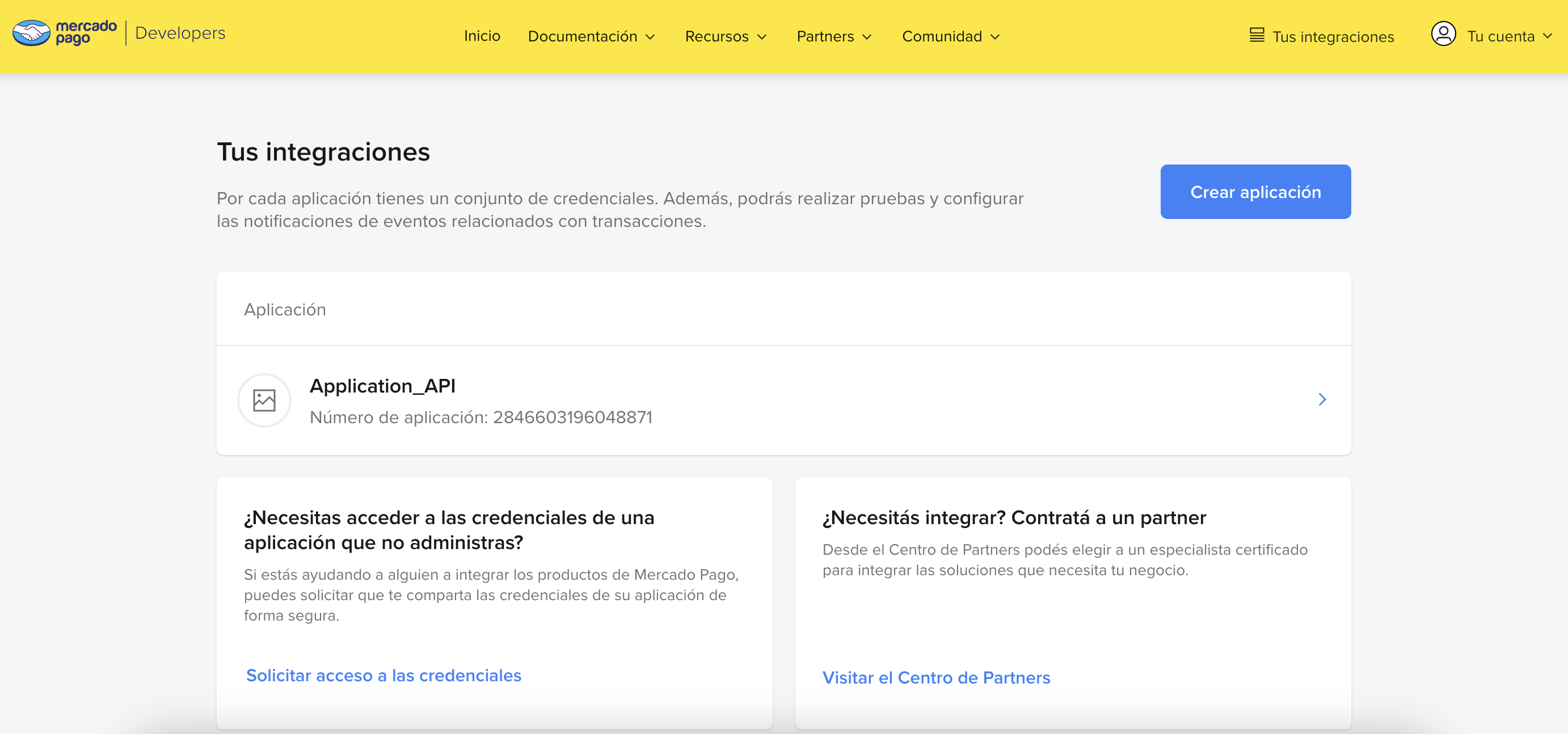
- Go to Your integrations and select the application for which you want to enable notifications.
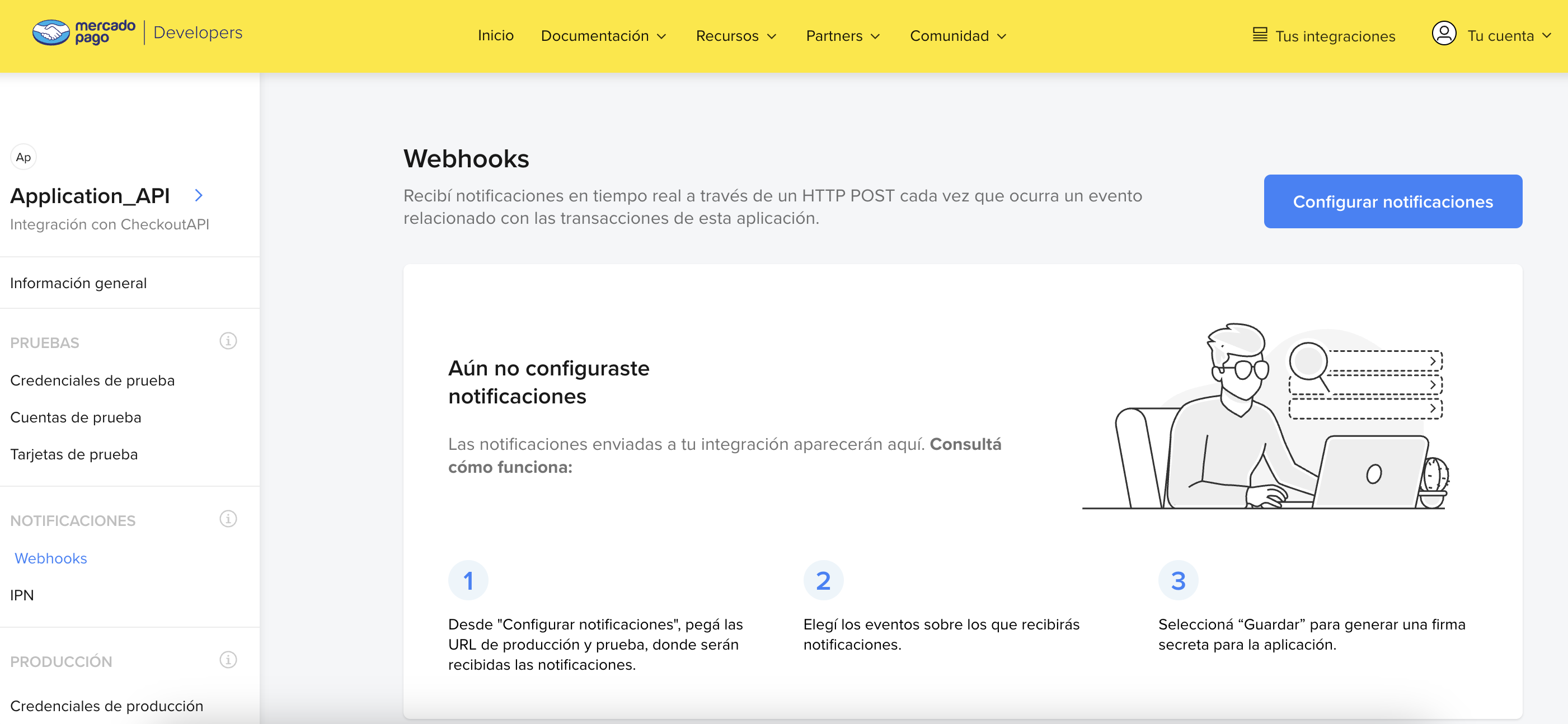
- In the left menu, select Webhooks > Configure notifications.
-
Select the Production mode tab and provide an
HTTPS URLto receive notifications. -
In the optional topics section, select the events you want to enable: Application linking, Claims, Chargebacks, and/or Fraud alerts.
-
Finally, click Save configuration. This will generate a secret key for your application. Note that this key has no expiration date and periodic renewal is not mandatory, though it is recommended. To do so, simply click the Reset button.
Simulate receiving the notification
To ensure that notifications are configured correctly, simulate receiving them by following the step-by-step instructions below.
-
After configuring the URL and events, click Save configuration.
-
Then click Simulate to verify that the indicated URL is receiving notifications correctly.
-
On the simulation screen, select the URL to be tested.
-
Choose the type of event you want to test and enter the Resource ID that will be sent in the notification body (
Data ID).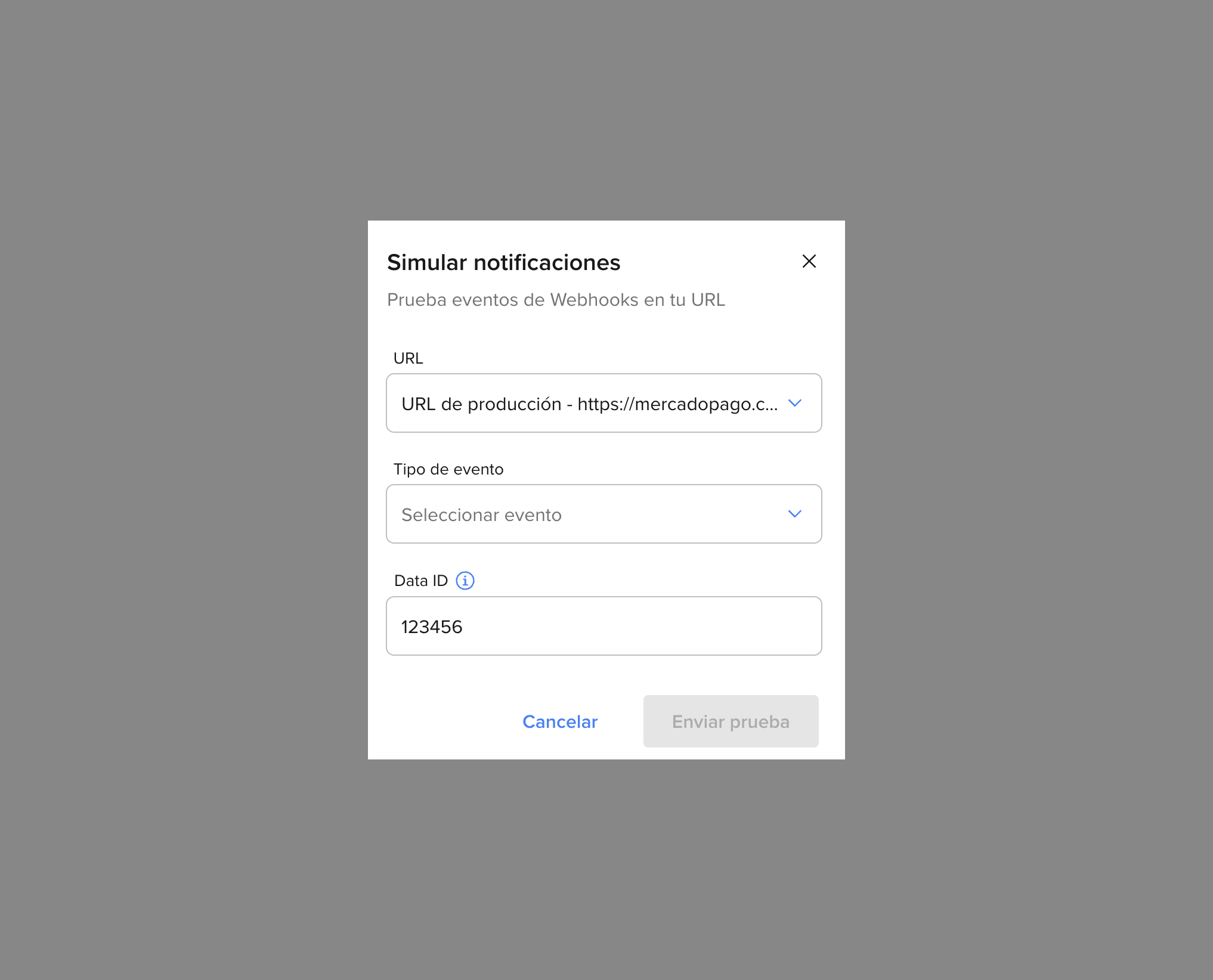
-
Finally, click Send test to check the request, the server response, and the event description.
Validate the notification origin
Validating the origin of a notification is essential to ensure the security and authenticity of the information received. This process helps prevent fraud and ensures that only legitimate notifications are processed.
Mercado Pago will send your server a notification that includes the following components:
- Query params: Accompany the request URL. They contain
data.idwith the notified resource identifier andtypewith the topic name. - Body: Contains the details of the notified event, such as
action,api_version,application_id,date_created,id,live_mode,type,user_idanddata. - Header: Includes the secret signature
x-signature, which allows validating the authenticity of the notification.
Below are examples of notifications for each topic.
plain
POST /?data.id=123456789&type=mp-connect HTTP/1.1 Host: test-optional-nots.requestcatcher.com Accept: */* Accept-Encoding: * Connection: keep-alive Content-Length: 187 Content-Type: application/json User-Agent: restclient-node/5.1.10 X-Request-Id: 4ed4fa2b-0b31-42ec-a62f-ad793c486c59 X-Rest-Pool-Name: /services/webhooks.js X-Retry: 0 X-Signature: ts=1781009491,v1=654866c48793d9f716f255f8a8e6cb162f643d93b29391daa6ac7ce78cf0ce81 X-Socket-Timeout: 22000 {"action":"application.authorized","api_version":"v1","data":{"id":"123456789"},"date_created":"2026-06-12T13:14:01.351Z","id":100000000000,"live_mode":true,"type":"mp-connect","user_id":123456789}
| Field | Type | Description |
action | string | Notified event. Possible values: application.authorized (linking) and application.deauthorized (unlinking). |
api_version | string | API version. Always v1. |
data.id | string | Identifier of the resource associated with the event. |
date_created | string | Notification creation date (ISO 8601). |
id | long | Unique notification identifier. Use it for idempotency control. |
live_mode | boolean | true in production, false in test mode. |
type | string | Always mp-connect. |
user_id | long | Identifier of the seller for whom the notification is sent. |
From the received notification, you can validate the authenticity of its origin using the secret key. This key will be sent in the x-signature header, with the following format:
plain
ts=1742505638683,v1=ced36ab6d33566bb1e16c125819b8d840d6b8ef136b0b9127c76064466f5229b
To confirm the validation, it is necessary to extract the key from the header and compare it with the key provided for your application in Your integrations.
Follow one of the approaches below to validate the authenticity of the notification.
The WebhookSignatureValidator from the official SDK handles validation internally following these steps:
- Your server receives a POST from Mercado Pago with the headers
x-signatureandx-request-id, and the query paramdata.id. - The SDK extracts the timestamp (
ts) and the hash (v1) from thex-signature. - The SDK builds the manifest:
id:<data.id>;request-id:<x-request-id>;ts:<ts>;. If any of the values are not present in the received notification, that pair is omitted from the manifest. - The SDK calculates
HMAC-SHA256(secret key, manifest)in hexadecimal. - It compares the calculated hash against
v1in constant time to prevent attacks. If they match, the notification is legitimate. If not, it throws a typed exception and your server must respond with401.
To get your secret key (secret), select the application in Your integrations, click Webhooks > Configure notification, and reveal the generated key.
<?php
use MercadoPago\Webhook\WebhookSignatureValidator;
use MercadoPago\Exceptions\InvalidWebhookSignatureException;

try {
    WebhookSignatureValidator::validate(
        $_SERVER['HTTP_X_SIGNATURE'],
        $_SERVER['HTTP_X_REQUEST_ID'],
        $_GET['data_id'],
        $secret
    );
    http_response_code(200);
} catch (InvalidWebhookSignatureException $e) {
    http_response_code(401);
}import { WebhookSignatureValidator, InvalidWebhookSignatureError } from 'mercadopago';
try {
WebhookSignatureValidator.validate({
xSignature: req.headers['x-signature'],
xRequestId: req.headers['x-request-id'],
dataId: req.query['data.id'],
secret,
});
res.sendStatus(200);
} catch (err) {
if (err instanceof InvalidWebhookSignatureError) res.status(401).end();
else throw err;
}from mercadopago.webhook import WebhookSignatureValidator, InvalidWebhookSignatureError
try:
WebhookSignatureValidator.validate(
request.headers.get("x-signature"),
request.headers.get("x-request-id"),
request.args.get("data.id"),
secret,
)
return "", 200
except InvalidWebhookSignatureError:
return "", 401import "github.com/mercadopago/sdk-go/pkg/webhook"
err := webhook.ValidateSignature(
r.Header.Get("x-signature"),
r.Header.Get("x-request-id"),
r.URL.Query().Get("data.id"),
secret,
)
if err != nil {
w.WriteHeader(http.StatusUnauthorized)
return
}
w.WriteHeader(http.StatusOK)using MercadoPago.Error;
using MercadoPago.Webhook;
try {
WebhookSignatureValidator.Validate(
xSignature: Request.Headers["x-signature"],
xRequestId: Request.Headers["x-request-id"],
dataId: Request.Query["data.id"],
secret: secret);
return Ok();
} catch (InvalidWebhookSignatureException) {
return Unauthorized();
}import com.mercadopago.webhook.WebhookSignatureValidator;
import com.mercadopago.exceptions.MPInvalidWebhookSignatureException;
try {
WebhookSignatureValidator.validate(
request.getHeader("x-signature"),
request.getHeader("x-request-id"),
request.getParameter("data.id"),
secret);
response.setStatus(200);
} catch (MPInvalidWebhookSignatureException e) {
response.setStatus(401);
}require 'mercadopago/webhook/validator'
begin
Mercadopago::Webhook::Validator.validate(
request.headers['x-signature'],
request.headers['x-request-id'],
request.params['data.id'],
secret
)
head :ok
rescue Mercadopago::Webhook::InvalidWebhookSignatureError
head :unauthorized
endActions needed after receiving the notification
When you receive a notification on your platform, Mercado Pago expects a response to validate that the receipt was correct. To do this, return an HTTP STATUS 200 or 201 within 22 seconds of receiving it.
We recommend that you first respond with a 200 or 201, and then process the notification on the server, to avoid duplicate notifications.
If this response is not sent, the system will make new delivery attempts every 15 minutes. After the first failures, the interval progressively increases, but deliveries continue until the notification is confirmed.
Additionally, keep in mind:
- Upon receiving a fraud alert, you must refund the payment without delivering the order by making a call to the Refunds API.
- For chargeback management, see the documentation.