
AI resources
Integrate Checkout Pro and set up a predesigned experience
Manage the transaction lifecycle with a flexible API while your customers buy on your site and pay in the secure Mercado Pago environment.
Agile integration
For web, Android, and iOS
Pre-built experience
With redirection
What it offers
Combine different features to ensure transaction security and conversion.
- Multiple payment experiences from a single API.
- Full transaction lifecycle management: creation, query, cancellation, and refund.
- Configurable installment options.
- Return URL after payment processing.
- Appearance and style of the payment button.
- Recovery of rejected payments.
- Option to pay without a Mercado Pago account, as a guest user.
- Quick payment with the payment methods available on Mercado Pago.
- Multiple payment methods, such as Abitab and Red Pagos.
- Transaction validation using industry-specific data.
- OWASP and PCI DSS protocols.
- 3DS 2.0 technology for transaction authentication.
- Fraud prevention tools and identity verification with FaceAuth.
Unified API
Customization
Conversion
Security
How it works
How to integrate
The buyer chooses the products or services on your site, pays in Mercado Pago’s secure environment, and returns to your website or the previously configured destination.
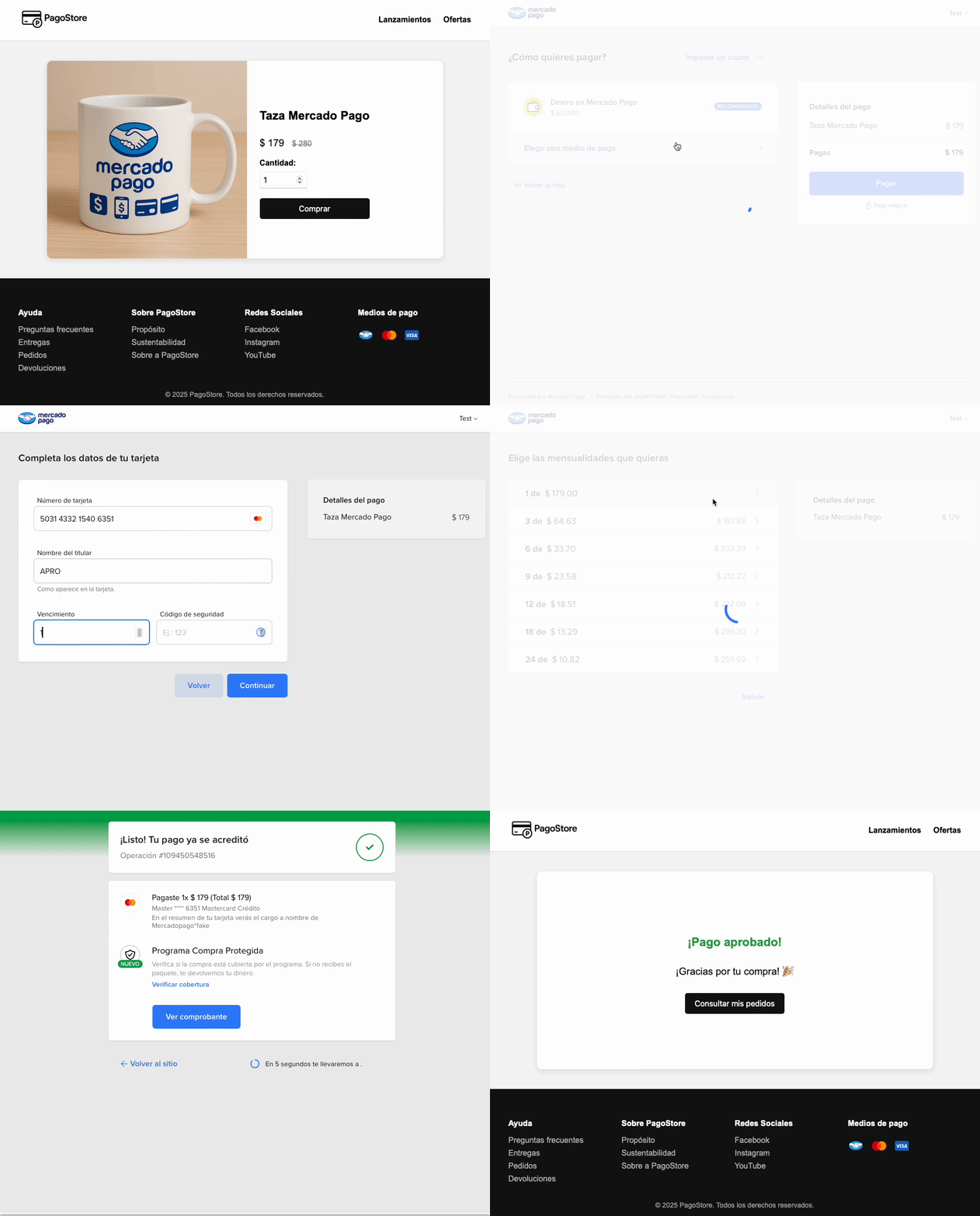
- The buyer completes their shopping cart on your website and chooses to pay with Mercado Pago.
- They’re redirected to the payment form, where they decide whether to proceed with a Mercado Pago account or as a guest user.
- Then, they enter their payment details and complete the purchase in the Mercado Pago environment.
- After payment processing, the buyer is redirected back to your website or the preconfigured destination.
What sets it apartCompare our checkouts and choose the option that best fits your business. Check the rates.
You are here
Checkout ProHow to integrate
Checkout APIGo to the overview
Checkout BricksGo to the overview
Integration effort
Integration effort
Integration effort
Integration effort
Customization level
Customization level
Customization level
Customization level
Design ready to set up
Design ready to set up
Design ready to set up
-
Design ready to set up
Collection experience
Collection experience
In Mercado PagoCollection experience
In your siteCollection experience
In your siteRecurring payments
Recurring payments
-
Recurring payments
Recurring payments
Payment methods
Payment methods
Credit or debit card, Abitab, Red Pagos and Mercado Pago Account Payment methods
Credit or debit card, Abitab, Red Pagos and Mercado Pago AccountPayment methods
Credit or debit card, Abitab, Red Pagos and Mercado Pago AccountAvailability by country
Availability by country
AR
BR
CL
CO
MX
PE
UY
Availability by country
AR
BR
CL
CO
MX
PE
UY
Availability by country
AR
BR
CL
CO
MX
PE
UY
How to integrate
Learn about the steps you need to follow to integrate this solution.
Prerequisites
- Seller accountTo integrate Checkout Pro, you need to access Mercado Pago and create a seller account.
- SSL Certificate (Secure Sockets Layer)Allows secure browsing and the protection of your data during information transfers.
    flowchart TD
    A[Your integrations] --> B[Create an application]
    B --> C[Configure the development environment]
    C --> D[Create a payment order]
    D --> E[Configure payment notifications]
    E --> F[Test your integration]
    F --> G{Was the test successful?}
    G -- No --> H[Fix configuration] --> F
    G -- Yes --> I[Go to production]